Fingerprint injection
tab.apply_fingerprint() overrides the browser identity signals that fingerprinting scripts read: User-Agent and Client Hints, navigator properties, WebGL, screen metrics, fonts, audio, timezone, and locale. The overridden values have to stay consistent with each other and with the layers apply_fingerprint() does not control (see Cross-layer consistency). An inconsistent fingerprint is more detectable than an unmodified browser.
This is identity substitution, not anonymity: it does not change the network-layer fingerprint or the egress IP.
Quick start
Call apply_fingerprint() before the first navigation. The JavaScript overrides are registered with Page.addScriptToEvaluateOnNewDocument, so they only apply to documents loaded after the call.
import asyncio
from pydoll.browser.chromium import Chrome
from examples.fingerprints import FINGERPRINTS
async def spoof_fingerprint():
async with Chrome() as browser:
tab = await browser.start()
# Apply before the first navigation.
await tab.apply_fingerprint(FINGERPRINTS['windows11_rtx3060_nyc'])
await tab.go_to('https://abrahamjuliot.github.io/creepjs/')
print('Fingerprint applied.')
await asyncio.sleep(5)
asyncio.run(spoof_fingerprint())
FingerprintConfig (from pydoll.protocol.fingerprint.types) is a typed dictionary. Only the fields present are overridden; the rest keep the real browser values. The profiles in examples/fingerprints.py are complete, internally consistent references for the config shape (see Providing your own profiles).
Where FINGERPRINTS comes from
Pydoll does not ship fingerprint profiles. FINGERPRINTS lives in examples/fingerprints.py in the pydoll repository, as reference profiles for the FingerprintConfig shape. Copy that file into your project to use them, then adapt each profile to your own machine and IP (the checklist below explains why). A profile reused as-is is a shared signature, not a disguise.
See the difference: a live bot-score test
Whether a fingerprint helps or hurts is measurable. fingerprint-scan.com, built by the engineer behind the Castle anti-bot blog, runs a fingerprinting and bot-detection test inside the page and reports a bot score from 0 to 100, where lower reads as more human. The three runs below are from the same machine (an Apple Silicon Mac, Chrome 151, headful), captured with Pydoll driving the browser and taking the screenshot.
No fingerprint, Pydoll driving real Chrome with nothing applied: score 15/100.
Real Chrome over CDP already reads as human: 15/100.
Pydoll starts low on its own. It drives a real Chrome over CDP, so the GPU, canvas, and TLS are authentic and navigator.webdriver is false. Closing the remaining gap to 0 is an area still being improved.
A macOS profile on the Mac, an OS-matched identity: score 15/100.
A matched macOS profile: still 15/100, consistent, not invisible.
Applying a Mac profile on a Mac changes the reported identity without contradicting the hardware underneath, so the score does not move. A matched profile is consistent, not invisible.
A Windows profile on the Mac, one field out of agreement: score 57/100.
One OS contradiction nearly quadruples the score: 57/100.
Same injection, same machine; the profile now claims Windows on a host whose kernel, GPU, and text rendering are macOS. That single contradiction nearly quadruples the score.
| Run (same Mac, Chrome 151, headful) | Bot score |
|---|---|
| No fingerprint | 15 / 100 |
| macOS profile on macOS (matched) | 15 / 100 |
| Windows profile on macOS (mismatched) | 57 / 100 |
Two takeaways. Injection makes the fingerprint consistent; it does not make the browser invisible: even the matched run scores 15, not 0, and closing that gap is still being worked on. And the value is in matching, which is why an inconsistent profile scores worse than no profile at all, and why every rule in the checklist below is about agreement between layers.
These numbers are a snapshot
One machine, one IP, one Chrome build, one point in time. Yours will differ, and detection sites change their scoring. Treat the scores as a demonstration of the direction (matched stays low, mismatched jumps), not as a guaranteed result.
The same test in headless mode starts much higher. With no profile, headless Chrome scores the maximum:
Headless, no profile: the maximum, 100/100.
Apply the macOS profile and the same headless run drops to 15, level with the headful result:
Headless with a macOS profile: 15/100, level with headful.
In headless mode the profile changes the result the most, from the maximum down to the headful score. The Headless mode section covers which signals it neutralizes.
The override, made visible
The easiest way to confirm a profile took effect is to read back a hardware signal. browserleaks.com/webgl reports the GPU behind WebGL. On this MacBook, with no profile applied, it reads the real chip, an Apple M4, with a macOS User-Agent:
No profile: the real Apple M4 and a macOS User-Agent.
Apply the Windows profile and the same page, on the same machine, reports an NVIDIA GeForce RTX 3060 and a Windows User-Agent:
Windows profile, same machine: an NVIDIA RTX 3060 and a Windows User-Agent.
apply_fingerprint() set the unmasked WebGL vendor and renderer through the injected overrides, alongside the User-Agent and Client Hints. One honest limit is visible in the same two shots: the WebGL Image Hash is identical (52497E30...). The renderer string now says NVIDIA, but the pixels are still drawn by the real Apple GPU, so the rendered-image fingerprint does not move. Overriding the string is necessary but not sufficient: a detector that rasterizes the output and hashes it still sees the real hardware. That is exactly why claiming an NVIDIA GPU on an Apple machine is the contradiction that pushed the score to 57 above, and why the checklist insists the profile's OS and GPU match the host.
Checklist
Rules for a profile that is not detected. Most describe a layer apply_fingerprint() cannot control, so the profile has to be chosen to match it rather than fight it.
- Profile OS = host OS. Do not run a Windows profile on macOS or the reverse; the kernel TCP/IP stack and GPU/text rendering expose the real OS in layers CDP does not reach (OS mismatch).
- User-Agent Chrome version = real binary version. Keep
CHROME_DESKTOP/CHROME_MOBILEequal to the major frombrowser.get_version(), and update them on every Chrome upgrade (Chrome version mismatch). - Locale, timezone, and geolocation = egress IP country.
Accept-Languageand timezone are cross-referenced against the IP (Locale/IP mismatch). - WebGL vendor/renderer = host GPU family (an Apple renderer on Apple hardware, and so on). The rendered pixels come from the real GPU and cannot be forged.
- Apply the fingerprint before the first navigation.
- One identity per browser context; use separate contexts for different identities (Multiple fingerprints across contexts).
- Do not combine the
--user-agentoption withapply_fingerprint(); the fingerprint owns the User-Agent. - Use a clean residential IP. Injection does not change IP reputation.
Overrides
Overrides are applied through two mechanisms.
CDP overrides
Signals Chrome can override itself are set through the DevTools Protocol Emulation domain. The browser applies these below the JavaScript layer, so the getter a detection script reads remains the native one and there is no JavaScript wrapper to inspect. When a CDP override exists for a signal, it is used instead of a JavaScript override.
| Signal | CDP command |
|---|---|
User-Agent, navigator.platform / vendor / appVersion, Client Hints (Sec-CH-UA*) |
Emulation.setUserAgentOverride |
Timezone (Intl, Date) |
Emulation.setTimezoneOverride |
| Geolocation | Emulation.setGeolocationOverride |
Screen size, devicePixelRatio, viewport, orientation |
Emulation.setDeviceMetricsOverride |
Locale (Intl formatting) |
Emulation.setLocaleOverride |
navigator.hardwareConcurrency |
Emulation.setHardwareConcurrencyOverride |
hardwareConcurrency illustrates the difference: a JavaScript getter is detectable (see below), while Emulation.setHardwareConcurrencyOverride changes the value with the getter staying native.
JavaScript overrides
Signals CDP cannot reach are set by a script injected before any page script on every new document, and replayed in Web Workers. This covers:
navigatorextras:deviceMemory,maxTouchPoints,doNotTrack,pdfViewerEnabledscreen.availWidth/availHeight(CDP forces these equal to the screen size, a headless signal),colorDepth,pixelDepth, andwindow.outerWidth/outerHeight- WebGL vendor, renderer, and parameter/precision values
navigator.mediaDevices, Web Audio,speechSynthesisvoices- Font availability (
document.fonts.check/FontFace.load) navigator.connection(Network Information API)navigator.permissionsquery results- WebRTC IP handling policy
Canvas and WebGL readback are not modified. Detection systems request the fingerprint repeatedly, so a value that changes between reads is itself an automation signal; the canvas of a real Chrome is stable. The WebGL vendor and renderer strings are overridden to match the claimed platform, but the rendered pixels are left unchanged.
Detecting JavaScript overrides
Fingerprinting scripts do not only read a property value; they inspect how it was defined and whether the surrounding objects were modified. Three checks are standard, and a naive override fails all three. CreepJS is the reference implementation.
Own-property vs prototype accessor. On a real browser, hardwareConcurrency is an accessor on Navigator.prototype, not a data property on the navigator instance:
Object.defineProperty(navigator, 'hardwareConcurrency', { get: () => 8 });
// navigator.hasOwnProperty('hardwareConcurrency') === true (real Chrome: false)
Object.getOwnPropertyNames(navigator) or a comparison against the prototype exposes the added own-property.
toString of the getter. A native getter reports as native code:
Object.getOwnPropertyDescriptor(Navigator.prototype, 'hardwareConcurrency').get.toString();
// real: "function get hardwareConcurrency() { [native code] }"
// naive: "() => 8"
Function.prototype.toString returns the JavaScript source of a hand-written getter, so a single call exposes it.
Cross-realm reads. A same-origin iframe or a Web Worker is a fresh realm whose navigator and prototypes are untouched by a hook installed only in the main realm. A worker's WorkerNavigator reporting the real value while the page reports the override is a contradiction.
How pydoll avoids these signals
- Getters are defined on the prototype (
Navigator.prototype,Screen.prototype), so the instance gains no own-properties. - Patched getters and methods report as native under
toString, and thetoStringpatch itself does not become a new signal. - The overrides are replayed in dedicated, shared, and service workers, so the page and the realms it spawns report the same values.
This is why an injected profile passes CreepJS's lie-detection, prototype, worker, and font checks instead of only changing the visible values.
The worker check is the one a naive override fails most often. CreepJS reads each signal in the main page and then runs the whole fingerprint again inside a Web Worker, a separate realm a main-thread hook never reaches. The screenshots below are from this Mac with the Windows profile applied.
In the main page, the navigator section reports the Windows identity end to end: platform Win32, Windows 11, the Windows User-Agent and appVersion, plus the plugin and mimeType lists, device memory, and core count.
Main page: navigator reports the Windows 11 identity.
Its WebGL section reads an NVIDIA GeForce RTX 3060 at high confidence, with the screen metrics from the profile beside it:
Main page: WebGL reads the NVIDIA RTX 3060.
The same fingerprint, re-read inside a service worker, reports the same GPU next to a Windows User-Agent, Win32, and Windows 11:
Inside a service worker: the same identity, replayed.
An override installed only in the main realm would leak the real macOS and Apple GPU values in that worker panel, and the disagreement between the page and its worker is exactly the contradiction CreepJS reports as a lie. Because Pydoll replays the overrides into dedicated, shared, and service workers, the two realms agree.
Headless mode
Headless Chrome exposes signals a headful browser does not, which is why bot checks often failed before fingerprint injection:
- WebGL renderer. Without GPU passthrough, headless Chrome renders through a software rasterizer (SwiftShader).
UNMASKED_RENDERER_WEBGLreportsANGLE (Google, Vulkan 1.3.0 (SwiftShader))orGoogle SwiftShaderinstead of a real GPU string such asANGLE (NVIDIA, NVIDIA GeForce RTX 3060 Direct3D11)orApple M3. Overriding the string alone is insufficient: the GPU capability surface (supported extensions, shader precision, max texture size) still reflects the software renderer and is cross-checked against the claimed GPU. - Empty
navigator.plugins/mimeTypes, where headful Chrome exposes the built-in PDF viewer entries. screen.availWidth/availHeightequal to the full screen size (no taskbar or dock gap), and a zeroed outer window.- Missing media devices, and font/audio rasterization differences from a machine with a display.
- On the old
--headless, aHeadlessChrometoken in the User-Agent (removed in--headless=new; the rendering signals above remain).
apply_fingerprint() overrides the WebGL vendor/renderer and the parameter/precision surface, reports availWidth/availHeight with a taskbar gap, restores media devices and fonts, and pins the User-Agent through CDP. With a profile applied, the detection sites tested report the browser as headful.
As the bot-score test above shows, headless goes from 100/100 with no profile to 15/100 with the macOS profile, the same as the headful run. That is what lets a plain Google search run in headless mode:
import asyncio
from pydoll.browser.chromium import Chrome
from pydoll.constants import Key
from examples.fingerprints import FINGERPRINTS
async def headless_google_search():
async with Chrome() as browser:
tab = await browser.start(headless=True)
# Neutralizes the headless rendering signals before the first navigation.
await tab.apply_fingerprint(FINGERPRINTS['windows11_rtx3060_nyc'])
await tab.go_to('https://www.google.com')
search_box = await tab.find(tag_name='textarea', name='q')
await search_box.type_text('pydoll', humanize=True)
await tab.keyboard.press(Key.ENTER)
await asyncio.sleep(3)
print('Google search completed in headless mode.')
asyncio.run(headless_google_search())
Fingerprint injection removes the headless rendering signals only. It does not change the IP: a datacenter IP with poor reputation is still challenged in headless and headful alike (see What Determines Success).
For Cloudflare Turnstile, the most common failure with a fingerprint applied is a Chrome version mismatch, not headless (see Chrome version mismatch). Headless Turnstile is still being validated; prefer headful for it.
Cross-layer consistency
Anti-bot systems correlate signals across layers. apply_fingerprint() keeps the layers it controls consistent, but three layers are outside CDP's reach and have to be matched separately:
- Chrome binary version. The network-layer fingerprint (TLS JA3/JA4, HTTP/2
SETTINGS) and the JavaScript engine version come from the real binary and cannot be overridden. A profile claiming Chrome 145 has to run on a Chrome 145 binary (see Chrome version mismatch). - Egress IP geography. The
Accept-Languageheader and timezone are checked against the IP's country. A US identity on a Brazilian IP is a contradiction (see Locale/IP mismatch). - Host OS. The kernel TCP/IP stack is a passive OS fingerprint (initial TTL 64 on macOS/Linux, 128 on Windows), and GPU/text rendering also reflects the real OS. Neither is reachable through CDP. A Windows profile on a Mac is an OS contradiction (see OS mismatch).
For the correlation model, see Browser Fingerprinting and Evasion techniques.
Locale/IP mismatch (Google)
Applying a US profile caused a plain Google search to return a captcha; removing the apply_fingerprint() call removed the block. The profile passed every dedicated fingerprinting site, so the trigger was specific to Google.
The profile declared a US identity (locale.languages = ['en-US', 'en']) on a machine behind a Brazilian IP with a Brazilian OS language. Google cross-references the Accept-Language header and Client Hints against the IP's country. en-US from a São Paulo IP is an unusual combination, and the request headers were inconsistent with the other signals, dropping the trust score below the captcha threshold.
The locale field drives:
- the
Accept-LanguageHTTP header sent on every request, navigator.languageandnavigator.languages,Intlformatting defaults (dates, numbers, currency).
All three are read by anti-abuse systems and have to agree with the timezone and the IP. Setting a Brazilian locale (matching the IP) removed the block with no other change.
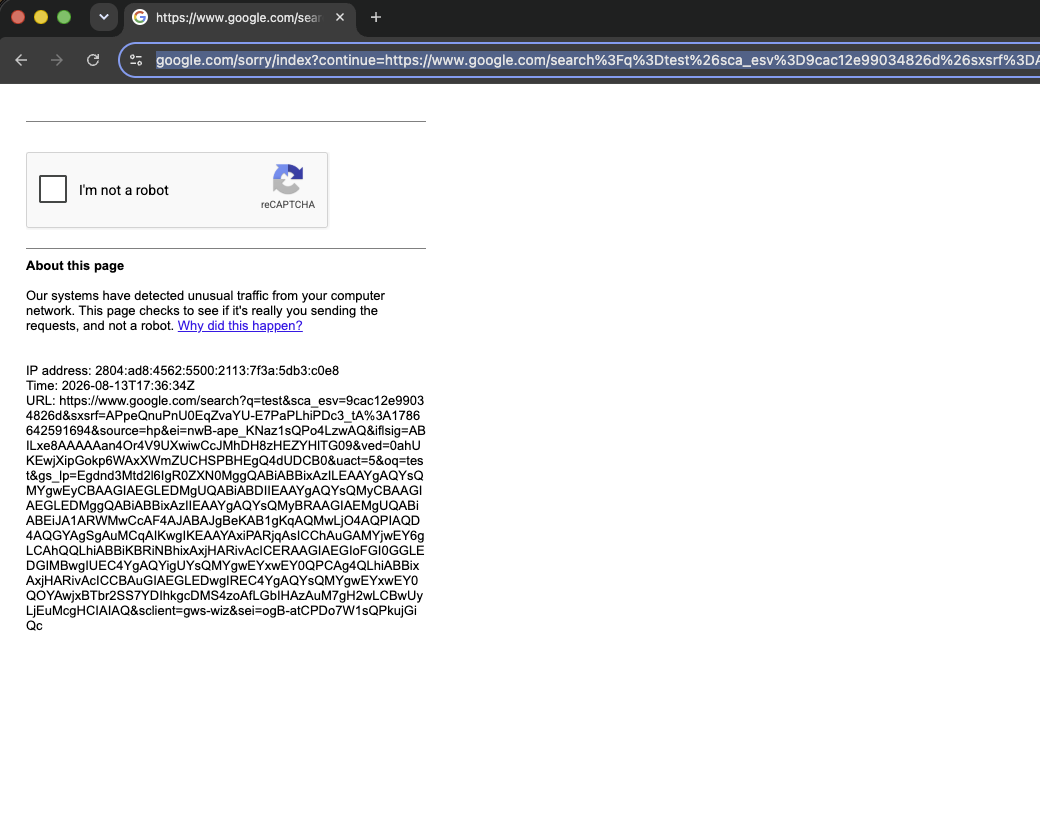
US locale over a Brazilian IP: Google returns a captcha.
Chrome version mismatch (Cloudflare Turnstile)
To combine the Cloudflare Turnstile interaction with a fingerprint, the advertised Chrome version has to match the real binary. This is the most common cause of Turnstile failure with a fingerprint applied.
Applying the macos_m3_new_york profile made Turnstile fail even headful: the page stayed on the "Just a moment…" interstitial, and removing the apply_fingerprint() call made it pass. The profile hardcoded Chrome 145 in the User-Agent while the binary was Chrome 151; apply_fingerprint() set navigator.userAgent, Sec-CH-UA, and navigator.userAgentData to 145 while the TLS/HTTP2 handshake and the engine stayed 151. A single-variable bisection confirmed it: changing only the advertised major from 145 to 151 turned every failure into a pass.
Two layers report the real version and cannot be overridden through CDP:
- The TLS fingerprint (JA3/JA4) and the HTTP/2
SETTINGSframe, produced by the real binary before any JavaScript runs. - The JavaScript engine surface (available APIs and their behavior), which reflects the real V8/Blink build.
Cloudflare's managed challenge compares the advertised version (User-Agent + Client Hints) against the observed version (handshake and engine). A real browser does not advertise a version it is not running, so 145 over a 151 handshake is an inconsistency and the interstitial does not clear.
Read the binary version and match the profile's User-Agent to it:
async with Chrome() as browser:
tab = await browser.start()
version = await browser.get_version()
print(version['product']) # e.g. 'Chrome/151.0.7922.137'
In examples/fingerprints.py, CHROME_DESKTOP and CHROME_MOBILE set the version in each profile's User-Agent. Set them to the binary's major (the full build feeds Sec-CH-UA-Full-Version-List; navigator.userAgent is reduced to Chrome/<MAJOR>.0.0.0). Update them when Chrome updates.
OS mismatch (Cloudflare)
With the Chrome version aligned, a second profile still failed. On this host (Apple Silicon, Chrome 151, Brazilian IP), macos_m3_new_york passes Cloudflare and windows11_rtx3060_nyc fails. The versions match (both 151), and the failing profile is the one geographically consistent with the IP, so neither version nor locale is the cause. The difference is the advertised OS.
A single-variable bisection from the passing profile toward the failing one tracked only the OS in the User-Agent:
- User-Agent/platform from Windows to macOS on the failing profile: passes.
- User-Agent/platform from macOS to Windows on the passing profile: fails.
- A Linux User-Agent: fails.
- GPU/WebGL (renderer, params, extensions), canvas, fonts, screen, hardware, audio, voices, geo, locale: no effect.
Any non-macOS OS fails on this macOS host. A macOS profile advertising an NVIDIA GPU passes; a Windows profile advertising the real Apple GPU fails.
Per-layer measurement, both profiles, same Chrome:
- TCP/IP: the server observes the same initial TTL of 64 (macOS/Unix) for both profiles; a Windows host emits 128. Not reachable through CDP.
- TLS (JA3/JA4): varies per connection (Chrome's padding-extension toggle); the fingerprint-free baseline produces both variants. Does not encode the OS.
- HTTP/2 (Akamai): identical between profiles. Does not encode the OS.
- Client Hints: fully overridden to the advertised OS (Windows reports
architecturex86, with noarmleak). - Canvas/WebGL: the rendered-image hash is identical between profiles (real Apple GPU pixels in both). Not the differentiator.
Everything apply_fingerprint() controls reports Windows; the kernel TCP/IP stack reports macOS. Cloudflare's managed challenge compares the advertised OS against the passive stack signature and keeps the interstitial when they disagree.
The TTL, window scaling, and TCP option order come from the host kernel, not the browser, and no CDP or JavaScript override reaches them. GPU rendering and text metrics (CoreText on macOS) are also the host's. TLS-forging clients (curl_cffi, tls-client) do not help here: the failure is not in TLS, and they still use the host kernel's TCP/IP stack.
To pass, match the profile OS (and GPU family) to the host: a macOS profile on this Mac, a Windows profile on a Windows host. A forwarding proxy (SOCKS5/HTTP CONNECT) re-originates the TCP connection from the proxy's kernel, so the observed OS becomes the proxy host's; a Windows profile then requires a proxy running on Windows (a Linux proxy gives a Linux signature, still inconsistent with a Windows User-Agent).
Multiple fingerprints across contexts
Service and shared workers are shared across every tab in a browser context, so a context holds a single identity. Applying a different fingerprint to a context that already has one raises FingerprintContextConflict:
from pydoll.exceptions import FingerprintContextConflict
# Same context, two different fingerprints -> conflict
tab_a = await browser.start()
await tab_a.apply_fingerprint(FINGERPRINTS['windows11_rtx3060_nyc'])
tab_b = await browser.new_tab() # same (default) context
try:
await tab_b.apply_fingerprint(FINGERPRINTS['macos_m3_new_york'])
except FingerprintContextConflict:
print('One context holds one identity.')
To run different fingerprints concurrently, use a separate browser context per identity:
ctx_id = await browser.create_browser_context()
tab_us = await browser.start()
tab_br = await browser.new_tab(browser_context_id=ctx_id)
await tab_us.apply_fingerprint(FINGERPRINTS['windows11_rtx3060_nyc'])
await tab_br.apply_fingerprint(FINGERPRINTS['android_s24_ultra_sao_paulo'])
See Browser Contexts for how isolated contexts work.
Providing your own profiles
Pydoll does not generate or ship fingerprints. The profiles in examples/fingerprints.py are a reference for the coherence a profile requires and the FingerprintConfig shape; they are not a catalog to deploy as-is.
A profile has to match its environment:
- the Chrome binary in use (the network layer is authentic and cannot be overridden), and
- the egress IP geography (locale, timezone, geolocation).
A public profile reused widely becomes a shared signature rather than a disguise.
Related
- Evasion techniques: User-Agent consistency, language, WebRTC leak protection, and what Pydoll gives you for free.
- Browser fingerprinting: the detection surface (canvas, WebGL, navigator, fonts) this page overrides.
- Network fingerprinting: the TLS/TCP/HTTP2 layer injection cannot reach.
- Browser contexts: run one identity per context.
- Proxies: match the egress IP to the profile's geography.